For the mobile side, we’ve built an application that users can draw some lines with the width information.
The white square at the center of this application is the drawing area which can get users’ input. Some black lines will be drawn along with the input. The blue buttons on the bottom are for the thickness of lines so that the users can simply select the desired one. We added a reset button in the case of redrawing.
The ‘Send’ button at the below is to send trajectory information to a physical robot. The data is about the relative coordinates with a starting point rather than the absolute coordinates. The drawing information would be saved by JSON type, as shown in the example below.
We wrote the proposal report and did presentation. The following is about the summary of proposal for our project.
Abstract—Although many areas with human physical labor have been replaced by high edge technologies, drawing is not fully replaced by robots or electric devices. People are still exposed to dangerous environment such as paint toxicity or car accident when they draw the road sign. Thus, this proposal proposed the replacement of drawing using robots controlled by mobile devices.
Literature Reviews:
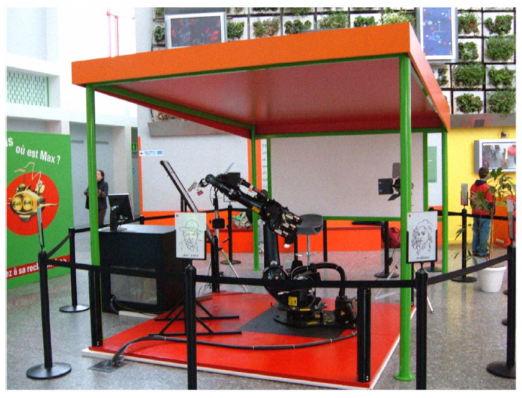
A. The Artist Robot: A robot drawing like a human artist
According to G. J-Pierre and Z. Said [1], the artist robot are designed to draw portraits and behave like a human artist with a 6 dof industrial manipulator.
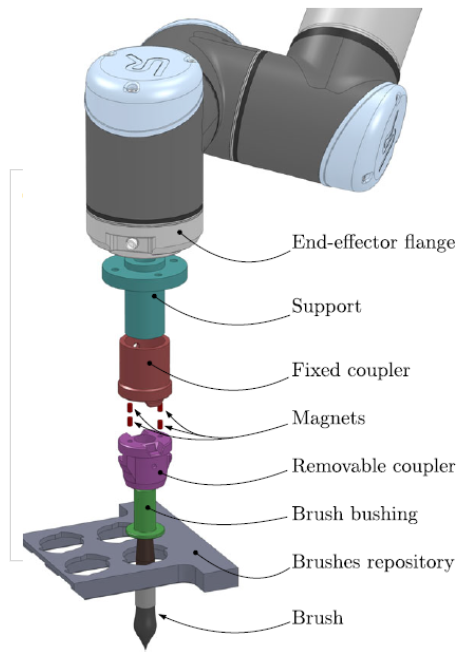
B. Watercolour Robotic Painting : a Novel Automatic System for Artistic Rendering
Scalera et al. [2] developed a watercolor painting automatic system where the robot Busker render an image and paint watercolor painting with different brush techniques
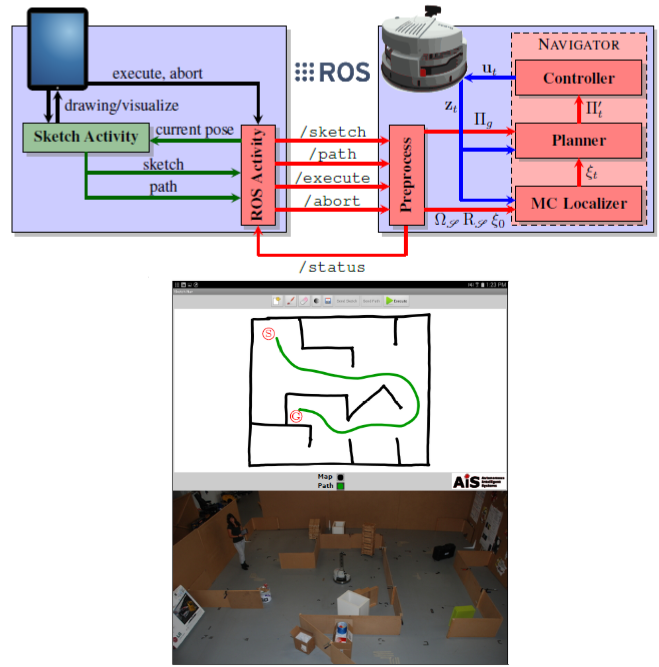
C. Autonomous Indoor Robot Navigation Using Sketched Maps and Routes
In 2016, Boniardi et al. [3] developed a system which uses hand drawn indoor map and trajectory on mobile devices for a robot to follow.
Methodoloy:
First of all, users can draw tracing on the mobile application’s surface. This application has functions, where it stores the trajectory of input and the users can select the thickness of their drawing, so that represents the brightness. Regarding the robot part, it mainly should be able to modify its motor’s angle to follow the given trajectory. While moving, a motor for drawing material on the robot can adjust the degree of a contact point between the pen tip and drawing surface. The mobile application and the robot should be connected to the computing side which can calculate coordinates regarding scale difference between mobile and physical environment.
[1] L. Scalera, S. Seriani, A. Gasparetto, and P. Gallina, “Watercolour Robotic Painting: a Novel Automatic System for Artistic Rendering,” 2018
[2] F. Boniardi, A. Valada, W. Burgard, and G. D. Tipaldi, “Autonomous Indoor Robot Navigation Using Sketched Maps and Routes,” Tech. Rep.
[3] G. Jean-Pierre and Z. Said, “The artist robot: A robot drawing like a human artist,” in 2012 IEEE International Conference on Industrial Technology, ICIT 2012, Proceedings, 2012.



 [CNIT581-SDR / Spring 2019] - Project: Drawing with Bob